Speeder
Speeder ⚡
Read faster. Move your eyes less.
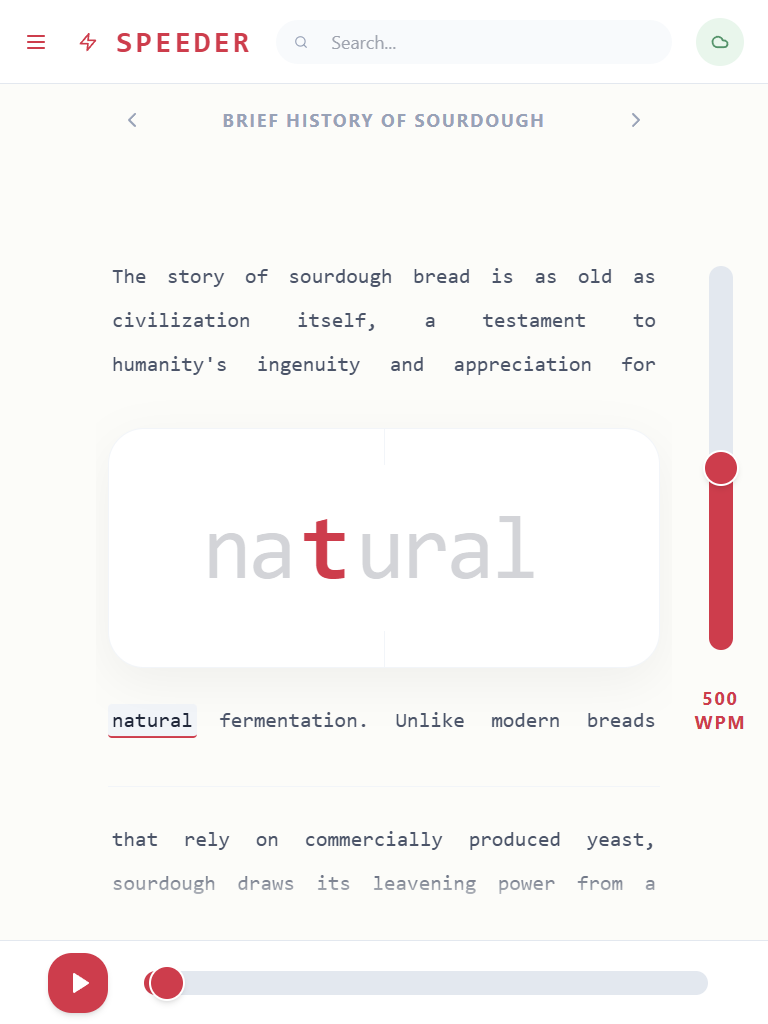
Speeder is a streamlined RSVP (Rapid Serial Visual Presentation) reading utility. Instead of scrolling down a page and tracking text left-to-right, words flash in a single, fixed location. By highlighting the Optimal Recognition Point (ORP) of each word, your eyes stay perfectly still while your brain processes the text. It reduces eye fatigue, minimizes distractions, and naturally improves your reading speed.
📖 How to Use
- Load a Document: Import a PDF, DOCX, or TXT file into your local library.
- Set Your Pace: Adjust the Words Per Minute (WPM) slider to match your rhythm.
- Focus: Keep your eyes on the highlighted center letter and press play.
✨ Key Features
📚 Bring Your Own Library Import your own .txt, .pdf, and .docx files. Everything is parsed and stored in your local device cache for immediate, offline access.
⚙️ Precision Control Change your reading speed on the fly from 50 up to 1,000 WPM. Quickly scrub backward or forward through the text using touch sliders or keyboard shortcuts.
📈 Reading Stats A built-in dashboard automatically logs your daily reading time, total word counts, and tracks your reading habits over a 30-day timeline.
☁️ Cloud Sync Set up an optional sync vault to securely keep your reading progress, document library, and UI settings updated across all your devices.
🤖 AI Generator Supply a free Google Gemini API key to instantly generate custom articles and reading material on any topic directly within the app.
🎨 Customisable UI Adjust the reading environment to suit your eyes. Switch between light and dark modes, set custom accent colors, and independently scale the focal and context text sizes. Include or hide punctuation based on your preference.
Download
Click download now to get access to the following files:
Comments
Log in with itch.io to leave a comment.
do you have a standalone desktop download planned?
Were you planning on running on a local server? I've added the zip file to the page that itch uses, and this has the assets included (for offline use).
If you want to use it hosted on itch, but without all the extraneous stuff, you can break it out of the iframe. You just need to find the URL although these might break.
I'm also experimenting packaging Android versions but haven't posted anything yet.
awesome that'll work for me
Thank you, and you're welcome. I added the Android package as a download.